As an Amazon Associate I earn from qualifying purchases. Some links on this page are affiliate links — I may earn a commission at no cost to you. Everything in the "what I race on" sections below is hardware I actually own and use.
This is the full setup behind every lap, every stream, and every guide on this site. No sponsored loaners, no spec-sheet reviews — this is the hardware bolted to my rig right now, plus honest notes on why each piece earned its spot.
Buying gear before Black Friday (Nov 27)? Read the Black Friday and Cyber Monday sim racing guide hub first: key dates, deal checklists and five rules for judging a deal.
Force feedback & controls
MOZA R9 Direct Drive Wheelbase
9 N·m of direct drive torque — enough headroom that it never clips on the heaviest braking zones, without the price or desk footprint of the high-end tier. My complete iRacing FFB profile for it is in the R9 settings guide.
Check price on Amazon →MOZA CS V2 Steering Wheel
The round CS-style rim my whole force feedback profile is tuned around — the Pit House Steering Wheel Inertia value (2800) is matched to this exact wheel's mass. Great for GT racing; swap to a formula rim and the inertia preset changes with it.
Check price on Amazon →MOZA SR-P Pedals
A load cell brake means you brake by pressure, not travel — the single biggest consistency upgrade in sim racing. These pedals live in the same Pit House software as the base, so one app manages the whole control stack.
Check price on Amazon →The PC
One machine does everything: renders iRacing, encodes the stream, and records. Getting that to work on a single PC without dropped frames took real debugging — the full story and the exact OBS settings are in the streaming guide.
NVIDIA GeForce RTX 5060 Ti (8 GB)
Renders iRacing at 1440p high-refresh and NVENC-encodes the live stream on the same chip. The reason my OBS guide exists: sharing one GPU between the sim and the encoder is a solvable problem, but only with the right settings.
Check price on Amazon →AMD Ryzen 7 5700 · 32 GB RAM
8 cores, paired with 32 GB of RAM and wired gigabit ethernet. iRacing is not CPU-hungry by modern standards — this handles a full 60-car grid plus OBS plus overlays without being the bottleneck.
Check price on Amazon →1440p 120 Hz G-SYNC Compatible Monitor
Single screen, high refresh, variable refresh rate — capped at 117 fps so the frame rate never leaves the VRR window. Why I haven't gone VR or triples yet is a whole decision framework: VR vs triples, honestly compared.
Shop 1440p high-refresh on Amazon →Stream extras
WHOOP 5.0 Band
Drives the live heart-rate overlay on my streams over Bluetooth — you can watch my pulse spike into the first chicane at the Nordschleife in real time. Half fitness tracker, half broadcast graphic. Mine is a 4.0; WHOOP discontinued it in 2025, so the link goes to the 5.0 that replaced it.
Check price on Amazon →If I were starting from zero today
Not everyone should buy this exact list — the right rig depends on where you are on the ladder. Two honest pointers instead of a shopping spree:
- Not sure sim racing will stick? Start on budget belt/gear-drive gear and upgrade when force feedback — not your racecraft — becomes the limiter. The full tier-by-tier ladder is in the best wheels for iRacing guide.
- Going direct drive? Budget for a rigid mount before the wheelbase itself. A clamped desk will not hold 9 N·m — flex kills the FFB detail you just paid for.
Watch it on track
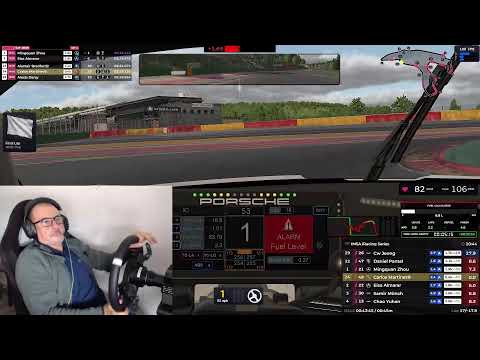
A full live stream from the @realtape channel. The video loads from YouTube (privacy-enhanced mode) only when you press play.
See this rig on track
Every lap on the channel is driven on the exact hardware on this page — race highlights, setup guides, and the mistakes too.
▶ Subscribe on YouTubeWant the exact settings for this rig?
The force-feedback, pedal and baseline profiles I run on this gear, written up as setup packs. The opening section of each pack is free to read.
See the setup packs →